
NANO BANANA · GPT IMAGE

Nano Banana 2 / 2.1 / Pro vs GPT Image 2.5Four models. Choose by the image you need.

Nano Banana 2, Nano Banana 2.1, Nano Banana Pro and GPT Image 2.5 are all available in My Look Story. The useful question is not which name wins everywhere, but which entry fits your subject, canvas and creative brief. This guide puts their current controls next to four actual outputs made from the same product reference and original English prompt. Choose a direction, open its model and make the next image your own.

  • Nano Banana 2 · 2.1 · Pro · GPT Image 2.5
  • Compare the settings available here
  • Up to 4 references · 1–8 outputs
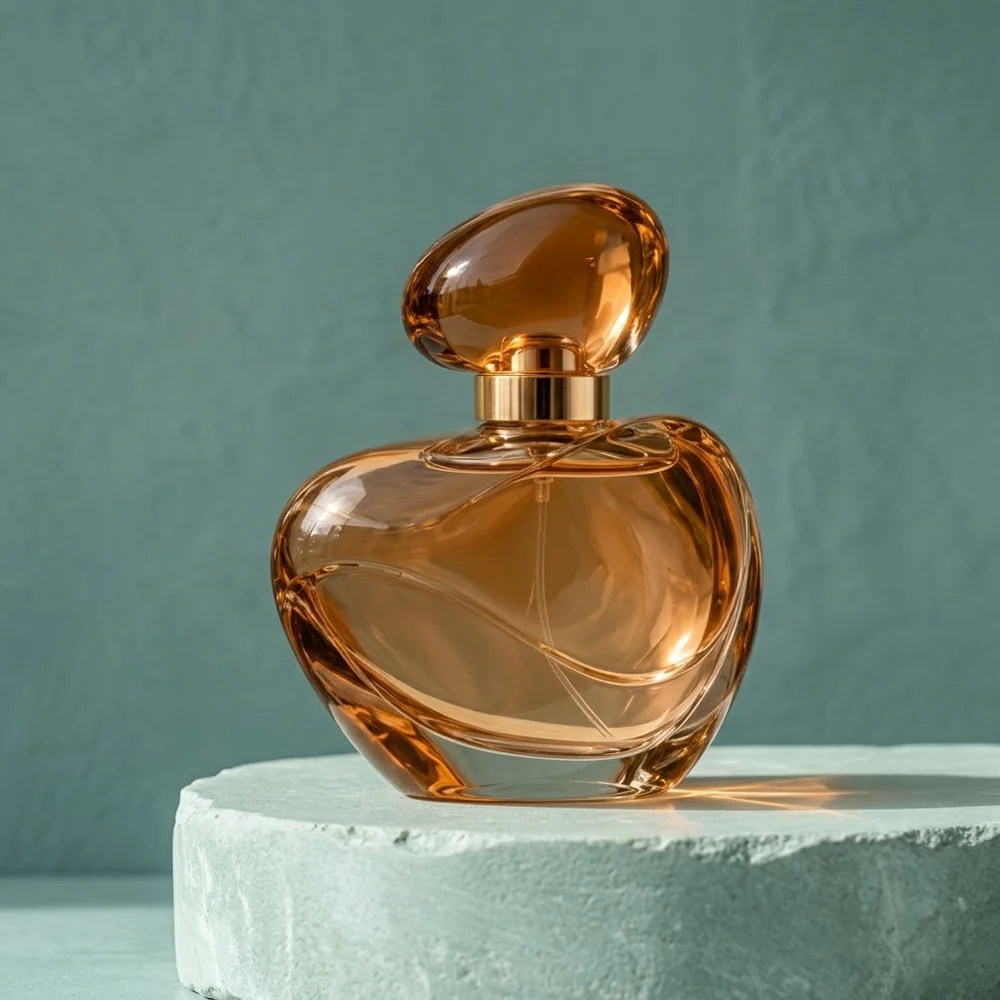
Nano Banana 2.1 · Amber perfume bottle on a pale seafoam stone plinth against teal
Nano Banana 2.1
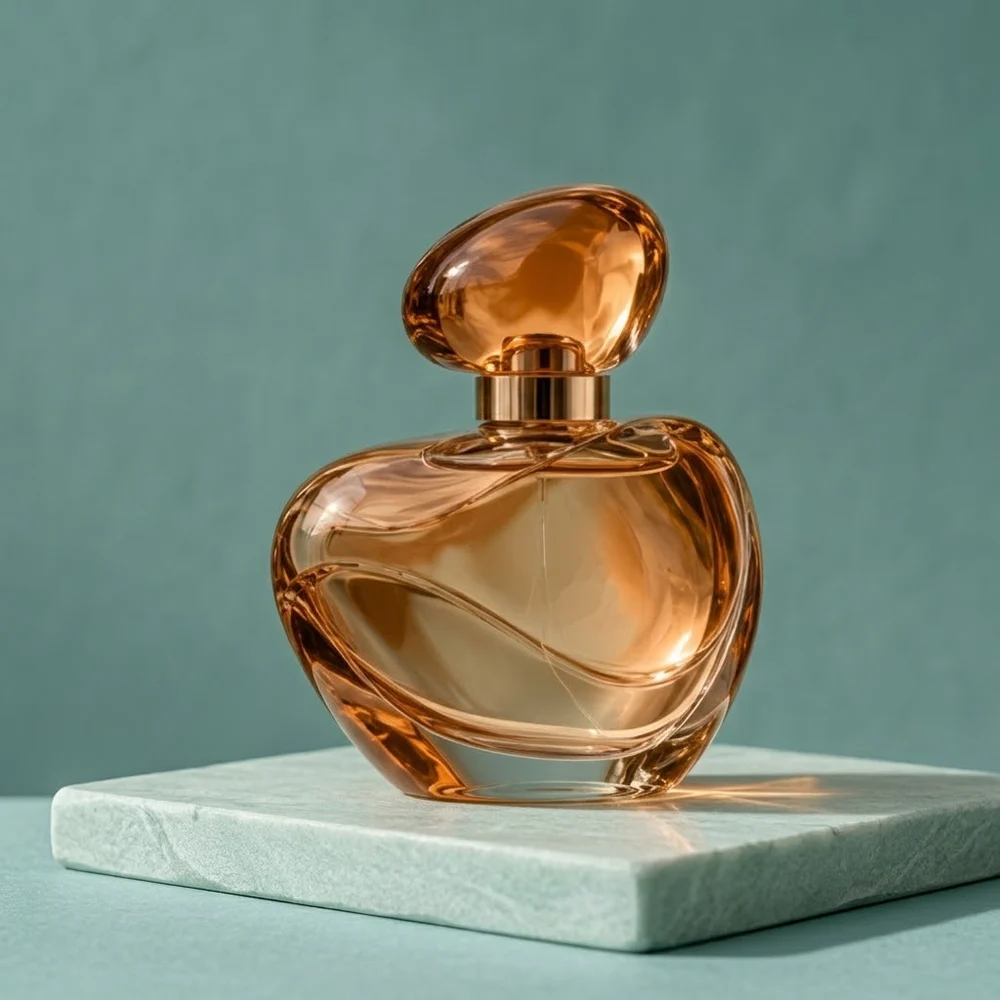
Nano Banana 2 · Amber perfume bottle on a pale seafoam stone plinth against teal
Nano Banana 2
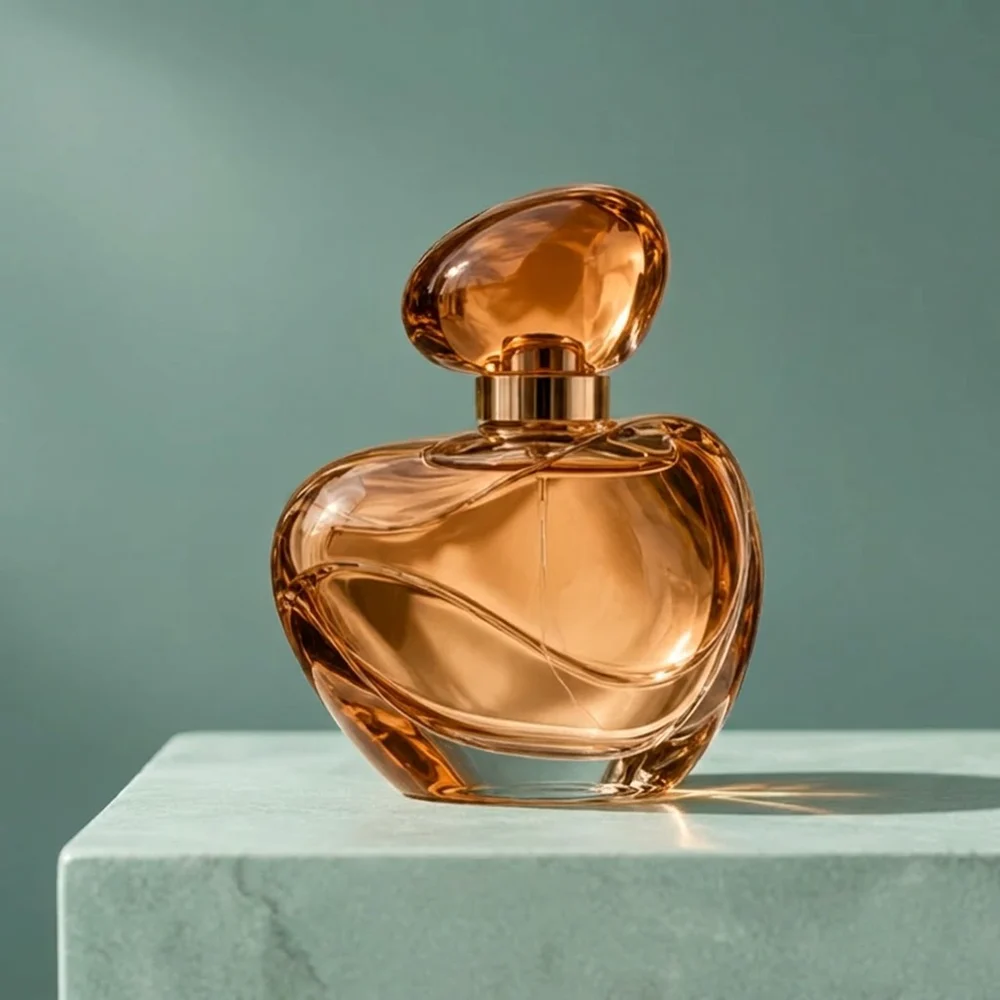
Nano Banana Pro · Amber perfume bottle on a pale seafoam stone plinth against teal
Nano Banana Pro
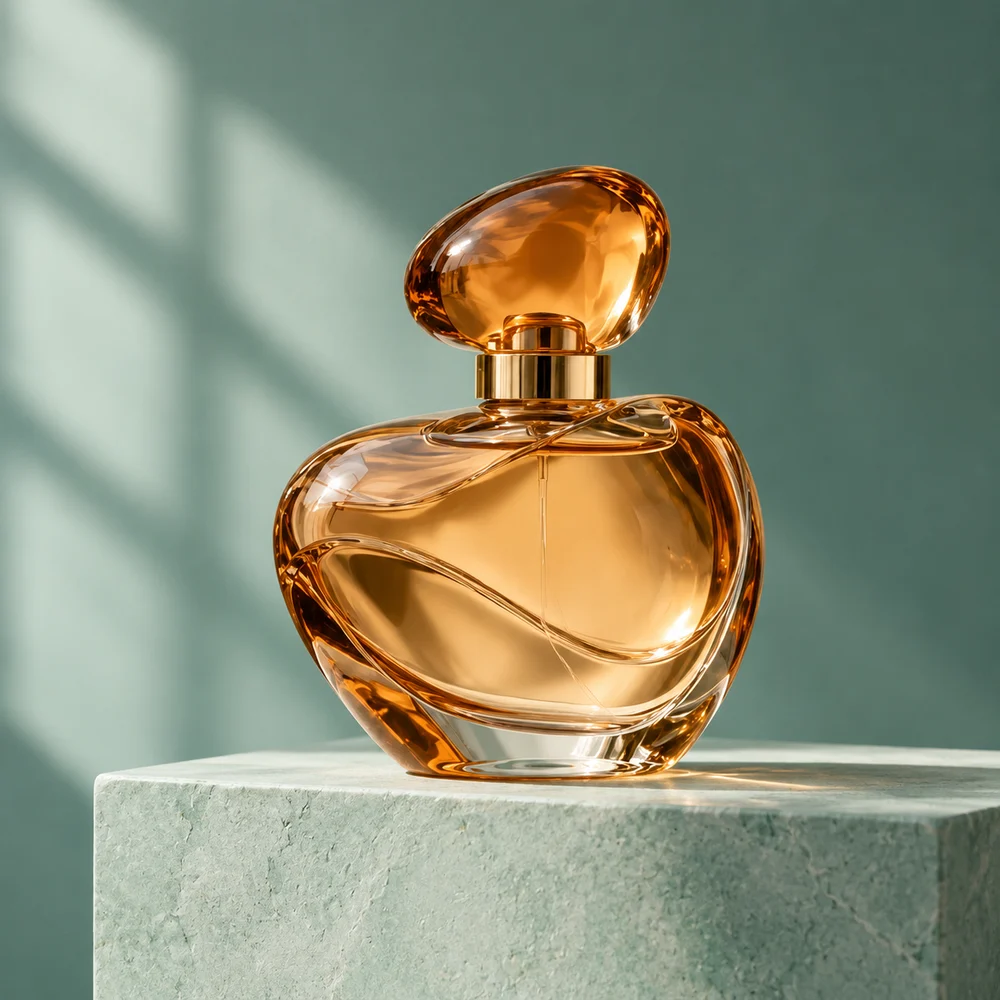
GPT Image 2.5 · Amber perfume bottle on a pale seafoam stone plinth against teal
GPT Image 2.5

What are you making? Start here.

The suggested model is a first candidate, not the only model capable of the task. Separate model strengths from output settings and your final delivery requirements.

Your taskSuggested starting pointWhy start thereWhen to choose differently
A new product campaign or social visualNano Banana 2.1 ↗Newer design and natural-rendering improvements make it a useful general starting point.Keep Nano Banana 2 when continuity with an established project is your main goal.
A character or product across new scenesNano Banana 2.1 ↗The update emphasizes sequential consistency and recognizable subjects.Try GPT Image 2.5 for a narrow change to one existing frame; Pro for a demanding composite.
A multilingual poster or labeled diagramNano Banana Pro ↗Reasoning, text hierarchy and localization are central to its positioning.2.1 is also a useful candidate for a simpler headline graphic; this is not an accuracy ranking.
Change one part of a reference pictureGPT Image 2.5 ↗Precise editing and subject preservation directly match the task.Choose a Nano Banana entry if the required output tier here is 2K or 4K.
A 4:1/8:1 banner or a very tall imageNano Banana 2.1 ↗Expanded canvas options here, plus documented panoramic improvements in the update.Nano Banana 2 also exposes these ratios; Pro and the current GPT entry do not.
Continue a project already built with Nano Banana 2Nano Banana 2 ↗A familiar model interpretation can matter more than switching mid-project.For a new project, begin with 2.1; switching models is not a guarantee of identical styling.

Strengths, trade-offs and the right task

Choose by the work you need to do—not by the version number. These starting recommendations combine official model positioning with the controls available here; they are not a speed, price or quality ranking.

Nano Banana 2

The previous-generation Flash workhorse: useful for continuing an established look and exploring alternatives, rather than the default upgrade for a new project.

Where it shines

Concept exploration

Supports visual brainstorming, scene variations and reference-based edits. Use it for cover concepts or moodboards when you already like how this model interprets your brief.

Images with words

Text generation and translation are part of its capabilities, not exclusive to Pro. A short greeting or promotion can combine a headline with its illustration in one image.

Wide-format concepts

Here you can choose 1K–4K and unusually wide or tall canvases. That makes it a practical comparison candidate for banners and vertical artwork.

Where it is less suitable

Google now recommends 2.1 for new projects. Nano Banana 2 predates its improvements to design, text and sequential consistency. Keeping a familiar workflow is a reason to use 2; an assumption that it must be faster or cheaper here is not.

On this workspace

There is no 512px tier or search-grounding control here. The extra ratios describe this integration; a 4K request is not a layered design or a print-ready document.

Choose another model when…

  • Nano Banana 2.1 — You are starting a new campaign or want the newer design and consistency improvements.
  • Nano Banana Pro — Your main difficulty is a tightly structured, multilingual or information-heavy layout.
Create with this model · Nano Banana 2 ↗
Nano Banana 2.1

Our suggested everyday starting point for a new image project: the newer efficiency-focused model with stronger design, natural rendering and subject continuity.

Where it shines

Product and campaign scenes

Improved visual design and realism suit a recognizable product placed in coordinated studio and lifestyle settings. Describe its shape separately from the new surface, light and background.

Recurring characters

Improved multi-turn consistency helps extend a character into new scenes. Keep an anchor reference and its defining details, while changing the action and setting—not the entire character brief.

Text-led and panoramic designs

The update improves text and infographic layout, and addresses tiling artifacts in extreme 2K/4K ratios. Useful directions include headline graphics, long banners and wide scene concepts.

Where it is less suitable

It is a broad workhorse, not an automatic replacement for every specialist brief. A dense diagram, demanding localization or tightly directed composition is a reason to also try Pro. Consistency is a model strength, not a locked identity or a pixel-preserving edit.

On this workspace

Here: 1K–4K, expanded ratios and up to four references. Google also describes masks, grounding and configurable thinking, but this workspace does not expose those controls or preserve a conversational editing session automatically.

Choose another model when…

  • Nano Banana Pro — A complex visual explanation or multilingual design needs more deliberate art direction.
  • GPT Image 2.5 — Your task is primarily a narrow edit with explicit instructions about what must remain unchanged.
Create with this model · Nano Banana 2.1 ↗
Nano Banana Pro

The premium reasoning-oriented choice for complex visual briefs: information hierarchy, multilingual design and closely directed image composition.

Where it shines

Information arranged visually

Useful for explaining a supplied process, turning notes into a diagram or laying out several related panels. Give it the actual labels, sequence and relationships rather than asking it to invent the underlying facts.

Typography and localization

Its text and multilingual capabilities suit a campaign with headline, subtitle and supporting labels, or a localized version of a design. Specify wording and visual hierarchy together.

Detailed art direction

Describe camera position, depth of field, material, color and lighting separately. This is a relevant candidate when the brief is already decided and the challenge is a coherent, controlled final visual.

Where it is less suitable

Pro does not mean universally better. Nano Banana 2.1 is the newer general-purpose efficiency route; a simple background concept may not need Pro's specialization. Small text, crowded faces and elaborate blending remain difficult. A factual-looking diagram is still not a verified source of facts.

On this workspace

The site provides 1K–4K and standard ratios, not 1:8/8:1. It accepts four references, not Google's full reference allowance, and has no grounding switch, brush mask or editable text layers.

Choose another model when…

  • Nano Banana 2.1 — You want broad concept exploration, a product series or an extreme banner ratio.
  • GPT Image 2.5 — You want to change one element of an existing picture while defining preservation constraints.
Create with this model · Nano Banana Pro ↗
GPT Image 2.5

An editing-focused candidate when your brief clearly separates what changes from what stays, with detailed scene instructions for text-to-image work too.

Where it shines

Targeted reference editing

The family emphasizes precise editing and subject preservation. Relevant tasks include changing a product's setting, replacing clothing or adding an object while describing the surrounding image that should remain.

Explicit scene relationships

Object counts, positions, materials and lighting can be written as a visual specification. This is a useful candidate for tabletop images, product arrangements and sketch-to-image concepts.

Text and design variations

The family supports headline graphics, layout translation and style transfer. Keep exact copy separate from decorative elements and assign each reference a clear role.

Where it is less suitable

Text placement, structured compositions and recurring brand elements can still drift. It is not a deterministic layer editor. Official Flare favors speed and Sunburst favors quality; our provider's generic 2.5 entry is not confirmed as either, so neither variant's advantage is promised here.

On this workspace

The current entry offers the 1K request tier, automatic quality and standard ratios. That is a site limitation, not the official family's resolution ceiling. Flare/Sunburst selection, 4K and transparent output are not available here.

Choose another model when…

  • Nano Banana 2.1 — You need this site's 2K/4K tiers or extreme banner ratios.
  • Nano Banana Pro — Your focus is a complex multilingual infographic rather than a narrow reference edit.
Create with this model · GPT Image 2.5 ↗

Compare the settings available here

Current workspace controls
ModelOutput tiersCanvas ratiosQuality
Nano Banana 2.11K / 2K / 4KStandard + 1:4, 4:1, 1:8, 8:1Automatic
Nano Banana 21K / 2K / 4KStandard + 1:4, 4:1, 1:8, 8:1Automatic
Nano Banana Pro1K / 2K / 4KStandard canvas setAutomatic
GPT Image 2.51KStandard canvas setAutomatic

One reference. One original prompt. Four results.

Same product reference, square canvas, 1K request tier, automatic quality, opaque background and one output per model. These are illustrative outputs, not a winner ranking or equal-price benchmark.

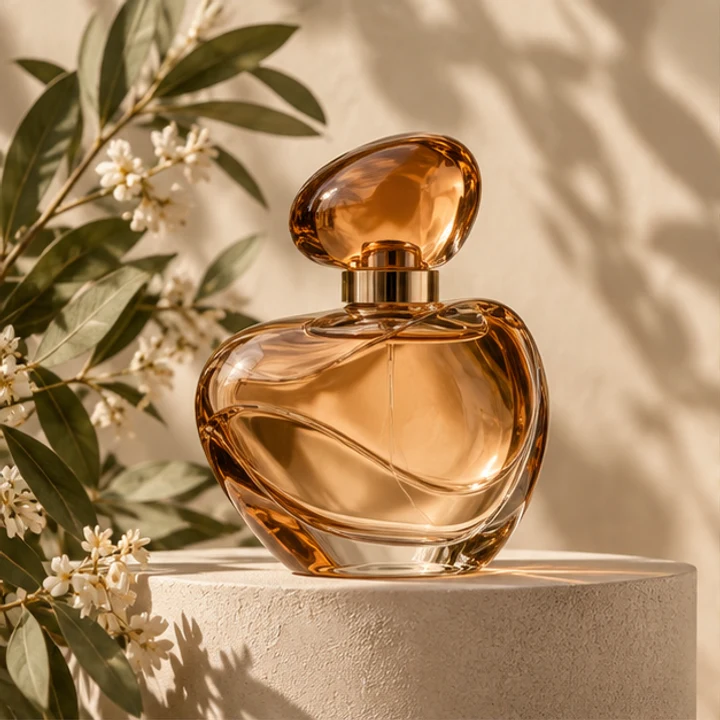
Owned reference photograph: amber perfume bottle among flowers and leaves
Reference input
Shared original prompt · English

Use image 1 as the product reference. Make a realistic studio product photograph of the same rounded amber glass perfume bottle with its oval amber cap and gold collar. Place it on a pale seafoam stone plinth against a muted teal background, with soft window light from the left and a believable contact shadow. Keep the bottle silhouette, glass material and liquid color recognizable. Remove the original flowers and leaves. No people, no labels, no text, no logos, no collage. One square finished image.

Nano Banana 2.1 · Amber perfume bottle on a pale seafoam stone plinth against teal
Actual model output · Nano Banana 2.1 · 1:1 · 1K

Nano Banana 2.1

Try this shared task ↗
Editable starting prompt

Use image 1 as the product reference. Make a realistic studio product photograph of the same rounded amber glass perfume bottle with its oval amber cap and gold collar. Place it on a pale seafoam stone plinth against a muted teal background, with soft window light from the left and a believable contact shadow. Keep the bottle silhouette, glass material and liquid color recognizable. Remove the original flowers and leaves. No people, no labels, no text, no logos, no collage. One square finished image.

Original prompt used for the displayed image (English)

Use image 1 as the product reference. Make a realistic studio product photograph of the same rounded amber glass perfume bottle with its oval amber cap and gold collar. Place it on a pale seafoam stone plinth against a muted teal background, with soft window light from the left and a believable contact shadow. Keep the bottle silhouette, glass material and liquid color recognizable. Remove the original flowers and leaves. No people, no labels, no text, no logos, no collage. One square finished image.

Nano Banana 2 · Amber perfume bottle on a pale seafoam stone plinth against teal
Actual model output · Nano Banana 2 · 1:1 · 1K

Nano Banana 2

Try this shared task ↗
Editable starting prompt

Use image 1 as the product reference. Make a realistic studio product photograph of the same rounded amber glass perfume bottle with its oval amber cap and gold collar. Place it on a pale seafoam stone plinth against a muted teal background, with soft window light from the left and a believable contact shadow. Keep the bottle silhouette, glass material and liquid color recognizable. Remove the original flowers and leaves. No people, no labels, no text, no logos, no collage. One square finished image.

Original prompt used for the displayed image (English)

Use image 1 as the product reference. Make a realistic studio product photograph of the same rounded amber glass perfume bottle with its oval amber cap and gold collar. Place it on a pale seafoam stone plinth against a muted teal background, with soft window light from the left and a believable contact shadow. Keep the bottle silhouette, glass material and liquid color recognizable. Remove the original flowers and leaves. No people, no labels, no text, no logos, no collage. One square finished image.

Nano Banana Pro · Amber perfume bottle on a pale seafoam stone plinth against teal
Actual model output · Nano Banana Pro · 1:1 · 1K

Nano Banana Pro

Try this shared task ↗
Editable starting prompt

Use image 1 as the product reference. Make a realistic studio product photograph of the same rounded amber glass perfume bottle with its oval amber cap and gold collar. Place it on a pale seafoam stone plinth against a muted teal background, with soft window light from the left and a believable contact shadow. Keep the bottle silhouette, glass material and liquid color recognizable. Remove the original flowers and leaves. No people, no labels, no text, no logos, no collage. One square finished image.

Original prompt used for the displayed image (English)

Use image 1 as the product reference. Make a realistic studio product photograph of the same rounded amber glass perfume bottle with its oval amber cap and gold collar. Place it on a pale seafoam stone plinth against a muted teal background, with soft window light from the left and a believable contact shadow. Keep the bottle silhouette, glass material and liquid color recognizable. Remove the original flowers and leaves. No people, no labels, no text, no logos, no collage. One square finished image.

GPT Image 2.5 · Amber perfume bottle on a pale seafoam stone plinth against teal
Actual model output · GPT Image 2.5 · 1:1 · 1K

GPT Image 2.5

Try this shared task ↗
Editable starting prompt

Use image 1 as the product reference. Make a realistic studio product photograph of the same rounded amber glass perfume bottle with its oval amber cap and gold collar. Place it on a pale seafoam stone plinth against a muted teal background, with soft window light from the left and a believable contact shadow. Keep the bottle silhouette, glass material and liquid color recognizable. Remove the original flowers and leaves. No people, no labels, no text, no logos, no collage. One square finished image.

Original prompt used for the displayed image (English)

Use image 1 as the product reference. Make a realistic studio product photograph of the same rounded amber glass perfume bottle with its oval amber cap and gold collar. Place it on a pale seafoam stone plinth against a muted teal background, with soft window light from the left and a believable contact shadow. Keep the bottle silhouette, glass material and liquid color recognizable. Remove the original flowers and leaves. No people, no labels, no text, no logos, no collage. One square finished image.

These are site-produced model samples, not customer testimonials. Links select a model and prompt only; they do not upload a photo or submit a generation. Localized starting prompts describe the same task, but the displayed outputs used the original English prompts.

From idea to a useful brief

01

Read the product example as a creative comparison

All four displayed outputs use our owned amber-bottle reference, the same English prompt, square aspect ratio, 1K request tier, automatic quality, opaque background and one output per model. The brief replaces flowers with a seafoam plinth and teal studio setting while asking to preserve the bottle design. We retained each returned image rather than selecting a winner from repeated trials. These examples show different interpretations of a shared task; they are not a statistically reliable quality ranking, an equal-price benchmark or a measurement of typical generation speed. Displayed WebP previews are resized for page performance.

02

Choose your constraint before choosing a favorite image

If you need a 2K or 4K output tier, the three Nano Banana entries have those choices in the current product; GPT Image 2.5 does not. If your composition needs 1:8 or 8:1, compare Nano Banana 2 and 2.1 first. If you are making a portrait poster with a short heading, all four can accept that written brief, but their interpretation can differ. Consider the amount of subject reference you have, the intended canvas and the credit estimate together. A beautiful square example is not evidence that the same model is always the best for an unrelated layout.

03

Make your own comparison without changing the task

Use one of the model buttons below to carry the shared product prompt into the workspace, then upload your own reference. When moving between models, keep the subject, wording and aspect ratio stable before changing other settings. The displayed previews were made from the original English prompt; each localized starting prompt conveys the same task but is not the identical text used for those samples. For your own comparison, repeat the exact wording. Each model guide also contains distinct use cases, so you can move beyond the common bottle example when a poster, storybook scene or editorial still life better matches your project.

Current workspace controls

Output tiers · Quality

Compare the settings available here

References and outputs

Text-only creation or up to 4 reference images; JPG, PNG or WebP, up to 25 MB each. Choose 1–8 outputs. Generated images are not editable design layers.

Credits before you submit

Opening the workspace does not generate an image. Sign in and check the current estimate for the model, output tier and count before submitting. No fixed generation time or universal price is promised here.

Questions before creating

Which model is best for everyone?

This guide does not give a universal winner. Model choice depends on the task, references, dimensions and available controls. We have not completed repeated same-condition testing sufficient to publish a quality or speed ranking. Start with the task guidance and use a brief relevant to your own project.

Are the displayed images actual model outputs?

Yes. They were generated through the corresponding enabled GrsAI model entries with an owned reference, not copied from another service or made by a different model. The original prompt and request settings are shown. These are editorial samples, not testimonials or results from a paying customer account.

Does automatic quality mean equal image quality?

No. Automatic quality is the setting exposed for each of these entries, not a normalized score shared by their underlying models. The 1K request tier also does not guarantee identical returned pixel dimensions. Use the model-specific resolution and canvas choices shown in the workspace.

Is My Look Story affiliated with the model makers?

My Look Story is an independent product integrating these model entries through GrsAI. Model names belong to their respective owners. The guide is produced by the site that offers the workspace, so it is not an independent marketplace ranking. Prices and availability are shown in the workspace before submission.

Your brief, your next image

Choose a model, adjust the idea and start in the workspace. The link does not submit a generation.

Start creating ↗

Reviewed: 8 October 2026

Prepared by My Look Story using actual model outputs and the currently available workspace settings. Independent service; not affiliated with Google or OpenAI.