
GOOGLE'S NANO BANANA 2.1 · CREATE HERE

Nano Banana 2.1Turn an idea into an image worth sharing.

Meet Nano Banana 2.1, Google's image model for stronger visual design, natural-looking images, subject consistency and clear text. Start from a description or bring your own photos. Choose this model in My Look Story and move straight into your creative workspace.

  • Text → image / Reference → image
  • Up to 4 reference images
  • 1K · 2K · 4K

Strengths, trade-offs and the right task

Choose by the work you need to do—not by the version number. These starting recommendations combine official model positioning with the controls available here; they are not a speed, price or quality ranking.

Nano Banana 2.1

Our suggested everyday starting point for a new image project: the newer efficiency-focused model with stronger design, natural rendering and subject continuity.

Where it shines

Product and campaign scenes

Improved visual design and realism suit a recognizable product placed in coordinated studio and lifestyle settings. Describe its shape separately from the new surface, light and background.

Recurring characters

Improved multi-turn consistency helps extend a character into new scenes. Keep an anchor reference and its defining details, while changing the action and setting—not the entire character brief.

Text-led and panoramic designs

The update improves text and infographic layout, and addresses tiling artifacts in extreme 2K/4K ratios. Useful directions include headline graphics, long banners and wide scene concepts.

Where it is less suitable

It is a broad workhorse, not an automatic replacement for every specialist brief. A dense diagram, demanding localization or tightly directed composition is a reason to also try Pro. Consistency is a model strength, not a locked identity or a pixel-preserving edit.

On this workspace

Here: 1K–4K, expanded ratios and up to four references. Google also describes masks, grounding and configurable thinking, but this workspace does not expose those controls or preserve a conversational editing session automatically.

Choose another model when…

  • Nano Banana Pro — A complex visual explanation or multilingual design needs more deliberate art direction.
  • GPT Image 2.5 — Your task is primarily a narrow edit with explicit instructions about what must remain unchanged.

A brief that plays to its strengths

For a product series, assign reference 1 to the product and reference 2 to the palette. Name the unchanged silhouette and material, then change one setting at a time using your chosen output as the next reference.
Create with this model · Nano Banana 2.1 ↗
NANO BANANA 2.1

Four reasons to create with Nano Banana 2.1

Use the model's strengths to solve a concrete creative task—not just to make another generic image.

01

Stronger visual design

Build a deliberate composition from a few visual decisions: the subject, materials, light, color palette and space around it. Nano Banana 2.1 is designed for better visual design, making it useful for product concepts, campaign imagery and editorial layouts. Describe the visual hierarchy rather than listing unrelated style words: one hero object, one clear light source and a background that supports the message.

Reimagine a product photograph ↗
02

A recognizable subject across new scenes

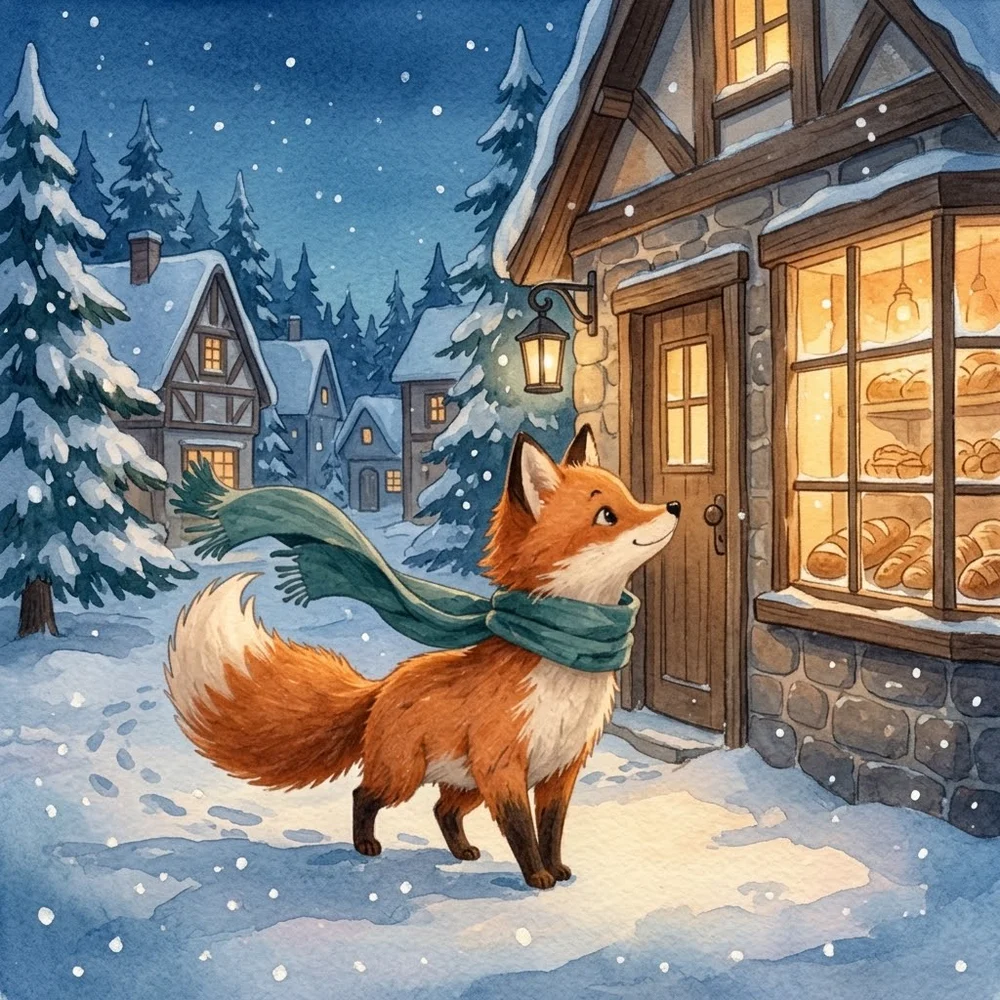
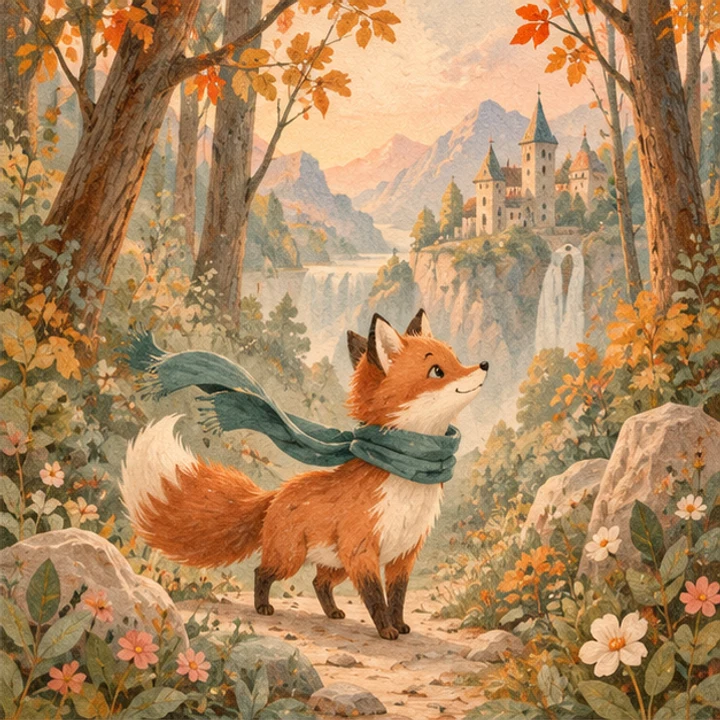
Reference images give the model an anchor for a product's shape or an illustrated character's distinctive details. Ask for the same subject in a new setting while naming the features to preserve. Our fox example keeps the orange fur, cream markings and teal scarf while moving into a snowy village. This is a practical starting point for a story series, character exploration or a coordinated set of creative concepts.

Give a character a new chapter ↗
03

Clear text inside the image

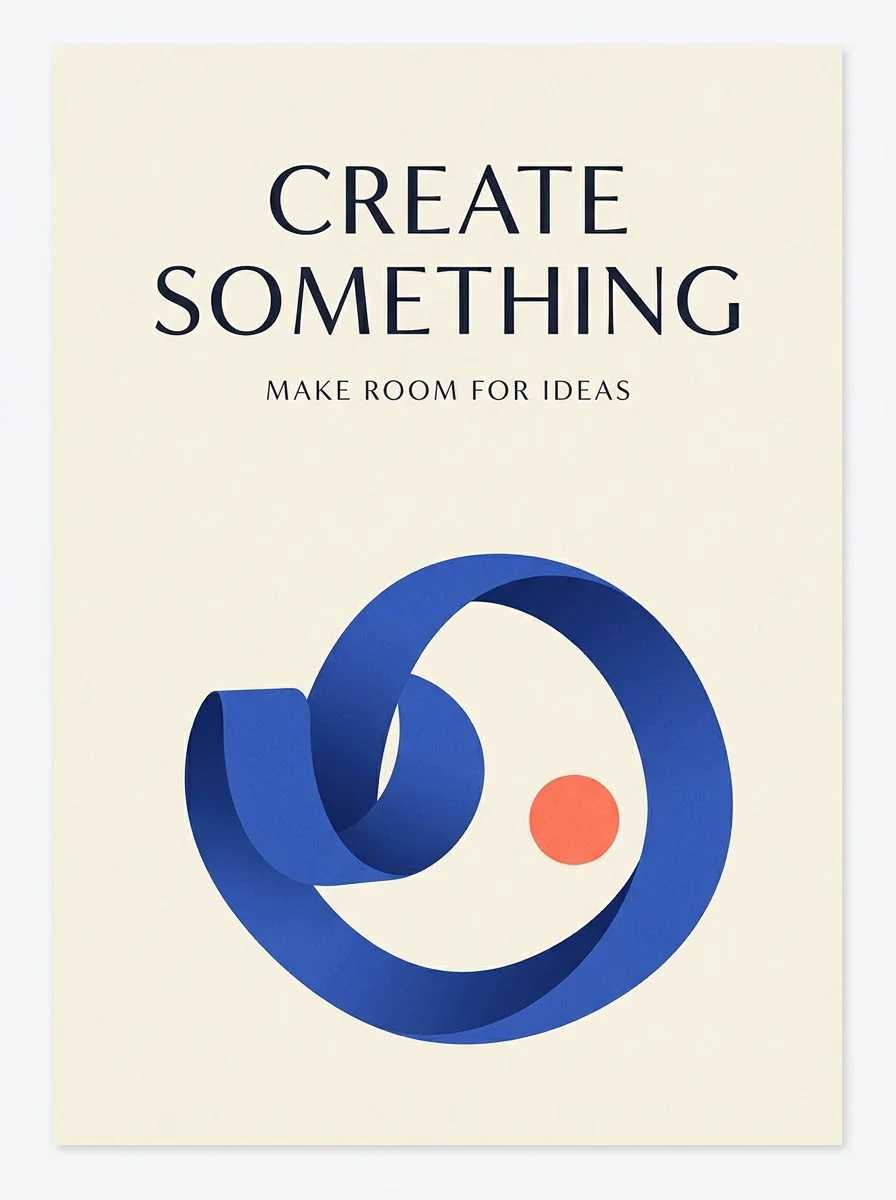
Create a poster with a headline as part of the composition, instead of generating art first and describing the typography afterward. Put the exact words in your prompt, identify their order and explain where each line belongs. Our poster uses a two-line headline and one short supporting line. This keeps the task focused on a readable message, generous margins and a coherent visual hierarchy.

Compose a poster with a message ↗
04

Natural light, materials and atmosphere

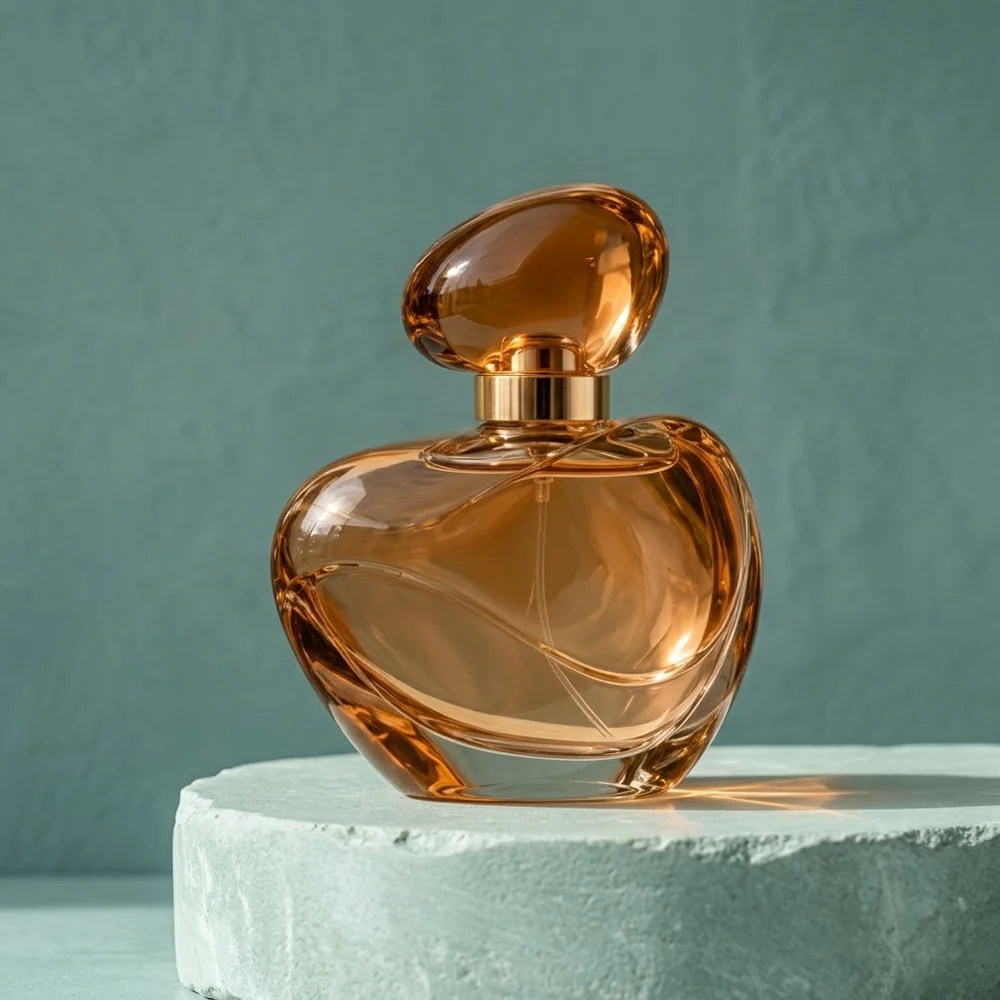
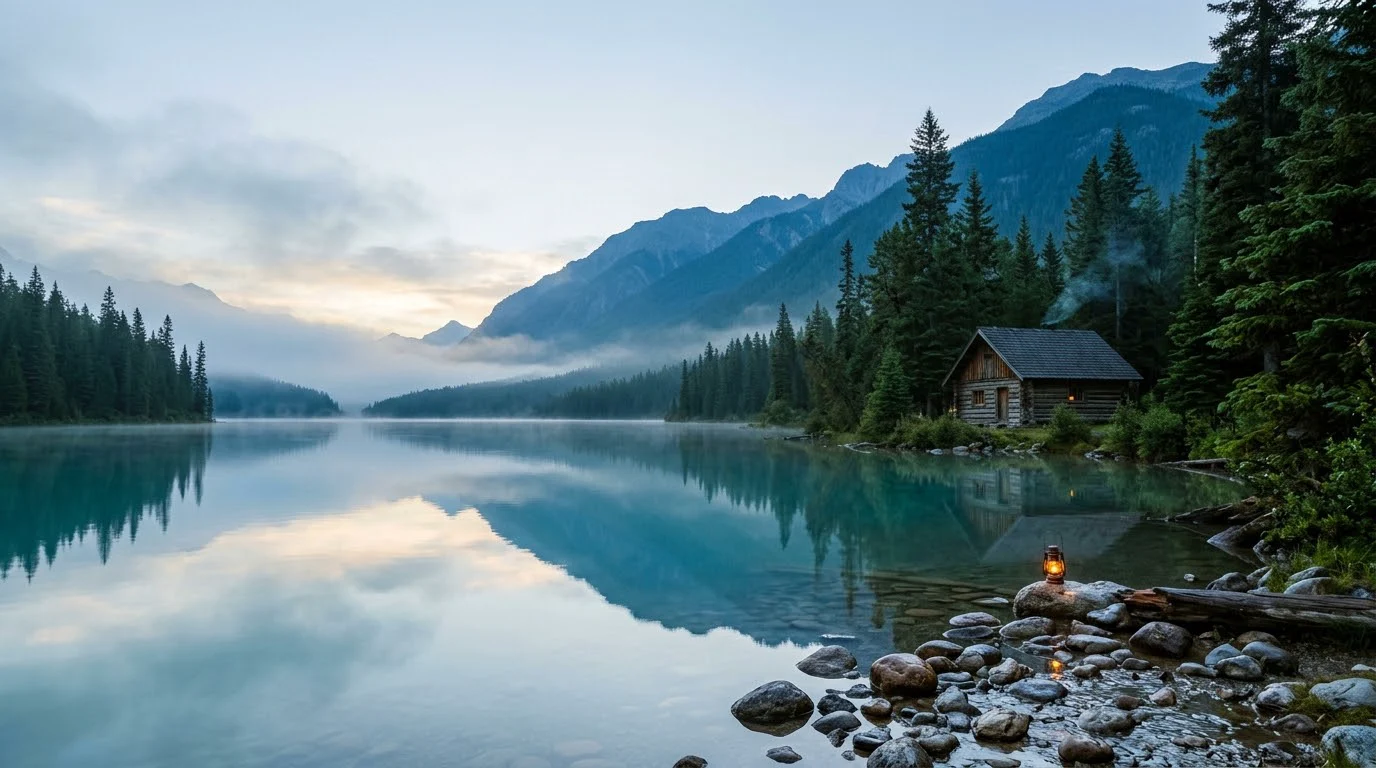
Describe how the scene should feel through visible details: soft window light through amber glass, mist between mountain layers or warm light on snow. Nano Banana 2.1 emphasizes more natural-looking images, so a photographic brief can name the material and lighting relationship as well as the object. Our landscape pairs a timber cabin with calm water, atmospheric depth and coherent reflections rather than an overloaded collection of dramatic effects.

Build a wide cinematic scene ↗

Made with this model. Ready for your ideas.

These original examples were generated with Nano Banana 2.1 through our model integration. Choose a direction to open the workspace with this model, its image ratio and an editable prompt already selected.

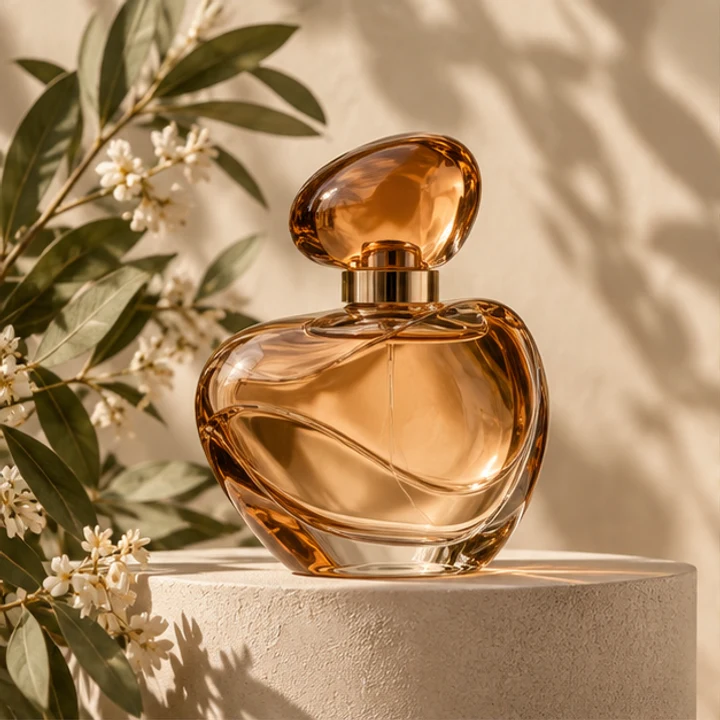
Reference · Reimagine a product photograph
Reference
Nano Banana 2.1 product image of a rounded amber perfume bottle on a seafoam plinth against teal
Nano Banana 2.1 output · 1:1 · 1K
01

Reimagine a product photograph

The reference anchors the rounded amber bottle, cap and gold collar; the prompt changes the plinth, lighting and surrounding color. Use this workflow when you want a new visual direction for an existing object, rather than a completely different product. Bring your own product photo into the workspace—the example reference is not automatically uploaded for you.

Create in this direction ↗
See the editable prompt

Use image 1 as the product reference. Make a realistic studio product photograph of the same rounded amber glass perfume bottle with its oval amber cap and gold collar. Place it on a pale seafoam stone plinth against a muted teal background, with soft window light from the left and a believable contact shadow. Keep the bottle silhouette, glass material and liquid color recognizable. Remove the original flowers and leaves. No people, no labels, no text, no logos, no collage. One square finished image.

Reference · Give a character a new chapter
Reference
Nano Banana 2.1 watercolor fox with a teal scarf outside a warm bakery in a snowy village
Nano Banana 2.1 output · 1:1 · 1K
02

Give a character a new chapter

A familiar orange fox appears in a snowy bakery scene instead of the original autumn setting. Its cream muzzle, fluffy tail and teal scarf are the identity cues in the brief. For your own story, upload a character reference and say which features stay the same, what changes in the environment and which illustration style connects the series.

Create in this direction ↗
See the editable prompt

Use image 1 as the character and illustration-style reference. Create a new single storybook illustration of the same orange fox, cream muzzle and chest, fluffy cream-tipped tail, and long teal scarf. The fox stands outside a cozy bakery in a snowy woodland village at blue hour. Warm golden light spills from the bakery window onto the snow, a few gentle snowflakes drift in the air, and the scarf moves slightly in the breeze. Keep a soft watercolor and textured-paper look, readable paws and one tail. No writing, no signs with letters, no extra foxes, no collage. One square finished image.

Nano Banana 2.1 ivory poster with blue ribbon and the text CREATE SOMETHING and MAKE ROOM FOR IDEAS
Nano Banana 2.1 output · 3:4 · 1K
03

Compose a poster with a message

Start without a reference image. Give the model the exact headline, supporting line, layout and palette. The blue ribbon and coral accent support the words rather than competing with them. This example is a creative workshop poster—not a photographed physical print—and shows how text and artwork can be planned together in one generation.

Create in this direction ↗
See the editable prompt

Create a polished editorial art poster for an imaginary creative workshop. A warm ivory paper background, a sculptural cobalt blue ribbon curling into an open loop in the lower half, and a small coral circle as an accent. Generous margins and a restrained graphic layout. At the top set exactly the large uppercase headline CREATE SOMETHING in two clear lines, and under it the smaller uppercase line MAKE ROOM FOR IDEAS. Spell every word exactly. No other words, no logos, no watermarks, no mockup frame. A single portrait 3:4 poster.

Nano Banana 2.1 wide image of a timber cabin by a turquoise mountain lake at dawn
Nano Banana 2.1 output · 16:9 · 1K
04

Build a wide cinematic scene

A horizontal mountain retreat leaves open sky and mist on the left for a later layout. Specify the ratio and where the focal point belongs before generating. This is useful for a moodboard, a story setting or a wide visual concept; the cabin and lake are imagined, not a photograph of a real travel destination.

Create in this direction ↗
See the editable prompt

Create a cinematic wide photograph of an imagined mountain lakeside retreat at first light. One small timber cabin rests on the right bank of a still turquoise lake. Pine forest and layered blue mountains recede into fine mist. The foreground has smooth wet stones and a single amber lantern. Natural atmospheric light, coherent reflections, finely detailed wood and foliage, calm muted colors. Leave open sky and distant mist in the upper left for optional later layout. No people, no text, no logos, no watermarks. A single horizontal 16:9 finished image.

Actual Nano Banana 2.1 outputs · 1K generation · Site-owned AI references for the two reference examples. Prompts are a starting point; each new generation creates a new image.

Start with an idea—or a photo you own

01

Describe an image from scratch

No reference photo is required for text-to-image. Write what the image is for, the main subject, its setting and the visual treatment. Add exact wording if the image includes text. Choose a ratio that fits its use: square for a product tile, portrait for a poster or wide for a scene. Begin at 1K while exploring a direction, then choose a higher resolution when your brief is ready.

Create with Nano Banana 2.1 ↗
02

Create with reference images

Add up to four JPG, PNG or WebP images that you own or have permission to use. Explain each image's role: subject, character, atmosphere or composition. Describe the features you want to keep and the change you want to make. The workspace combines your references with your prompt; it is not a pixel-level manual editor. An example button preloads the brief, while you supply your own reference images.

Create with Nano Banana 2.1 ↗

The controls you can use here

Resolution, ratio and output count

Select Nano Banana 2.1, choose 1K, 2K or 4K and pick a supported aspect ratio. You can request one to eight images in a task. Resolution describes the model's output tier rather than a custom width-and-height editor; the exact dimensions depend on the ratio. This page's examples use 1K so you can begin with the same setting.

Credits before you create

The workspace displays the estimated credits for your chosen model, resolution and image count before you submit. Raising resolution or requesting more outputs changes that estimate. Sign in to create, keep your task history and download completed images. There is no claim of unlimited free generation on this page; the current workspace estimate is the price reference.

Your images and your creative control

Upload only photos you are entitled to use. Images are processed to fulfill your generation task, and account history lets you return to completed work. Use the privacy page for processing details and contact support for deletion questions. This integration currently offers prompts and references, not a mask brush, search-grounding switch, transparent-background mode or a video generator.

Before you start

Is Nano Banana 2.1 a Google model?

Yes. Google lists Nano Banana 2.1 as an image-generation model. My Look Story is an independent service and makes the selected model available through its GrsAI integration; this is not Google's own website and does not imply a partnership or endorsement.

Can I use it without uploading a photo?

Yes. Use a prompt alone for text-to-image, such as the poster and landscape examples. Upload references when you want a particular subject, character or visual style to inform the new image.

How do I make a reference-based variation?

Choose a reference example, open the workspace and upload your own images. Name the features to preserve, then describe the new environment or treatment. The model and ratio are preselected; your photos are never silently replaced with the demonstration reference.

Does the page show real outputs from this model?

Yes. The four finished examples were generated with Nano Banana 2.1 on October 7, 2026. Reference panels show the input assets separately. They are original AI examples, not customer photographs, competitor outputs or a side-by-side model ranking.

Can I change the example prompt?

Yes. The example button opens an editable prompt. You can change the subject, setting, wording, palette and ratio before creating. The original English prompt is also available on this page so the displayed example has a transparent generation brief.

How is this different from a ready-made photo filter?

A filter starts with a selected visual effect for your photo. This model page is for a more open brief: generating an imagined scene, creating a designed image or changing a reference-based concept. If you want a preset artistic transformation instead, explore the photo-filter tool.

Make the next image your own.

Pick an example or bring a fresh idea. Nano Banana 2.1 will be selected when you arrive in the workspace.

Create with Nano Banana 2.1 ↗

Reviewed October 8, 2026

How this page was made: official model capability review, live workspace checks and four original model generations. Examples are not a comparison benchmark.