Put your photo inside a fictional neon-lit portrait
Want a cyan-and-magenta glow, a night-city mood and a more cinematic personal avatar? Compare the illustrations, then open the workspace with Cyberpunk selected. This is a generative reinterpretation of a still photo, not a camera color preset that leaves every pixel intact. Clothes, setting, skin and objects may change. Use it as original visual fiction, not evidence that you visited a place, wore a uniform or took part in an event.
Style illustrations, not verified before-and-after outputs from the live tool. They show a visual direction; your photo may produce different colors, likeness and details.
Choose atmosphere without letting the face disappear
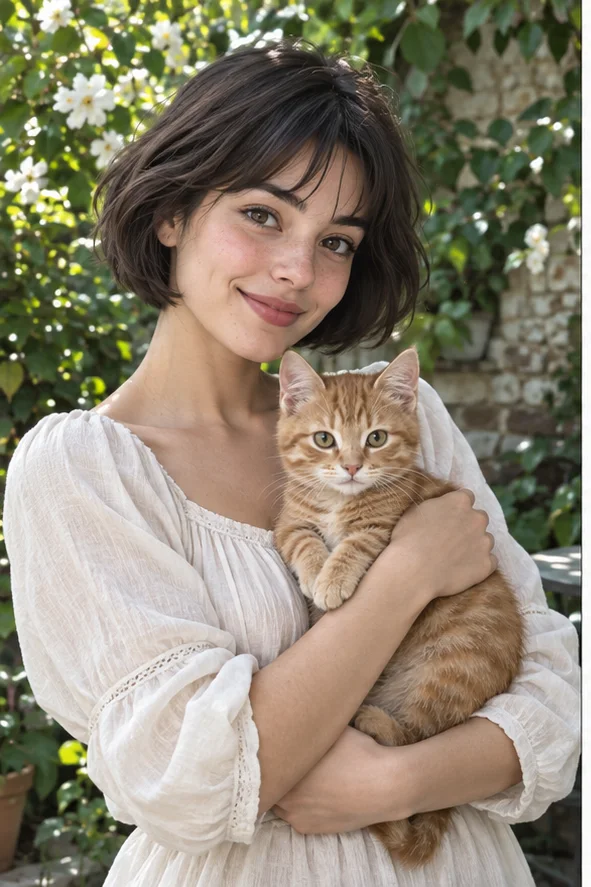
The point is the relationship between the subject and an invented night setting: colored light, dark surroundings and bright accents. Our reference changes the whole scene, not only saturation. It can work for a personal avatar or a fictional editorial image if the person remains readable at the destination size. If you need authentic skin color, exact clothing, a real venue or an unaltered documentary portrait, keep the source photo and use a conventional editor instead. This preset cannot promise an identical face beneath the neon.
Neon setting, printed comic, or softer anime?
Our illustrations compare a lighting-and-environment direction with two drawn directions. They are owned visual references, not paid head-to-head tests or customer results. Observe eyes and silhouette as well as the palette.
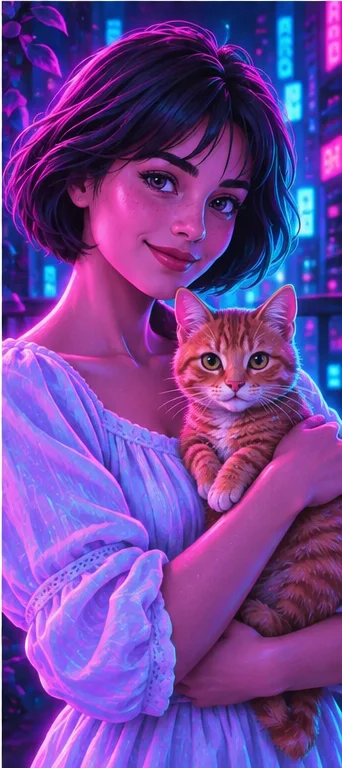
Cyberpunk: colored light and an invented city
The face, shirt and cat receive cyan and magenta light, while signs and depth suggest an imagined city. Choose it for atmospheric fiction. Check whether neon highlights flatten the eyes or turn whiskers into decorative streaks. The preset has no independent lighting positions, exact color-hex controls or guaranteed real-world city replacement.
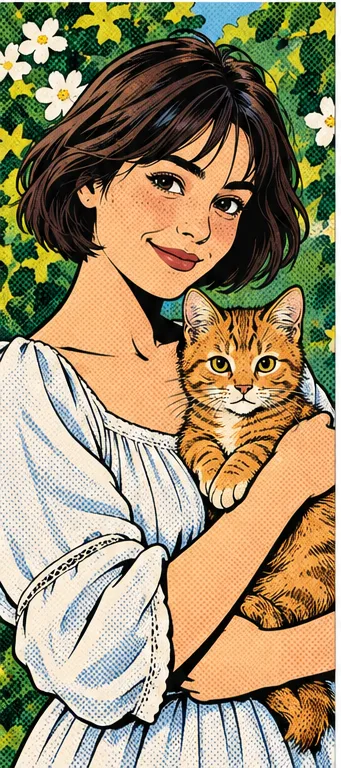
Black outlines and printed dots carry the drawing. Compare it if you need stronger graphic boundaries instead of luminous atmosphere. It does not automatically keep the cyberpunk background or create comic panels. A dramatic palette and a readable outlined face solve different visual jobs; choose based on the final use, not color intensity alone.
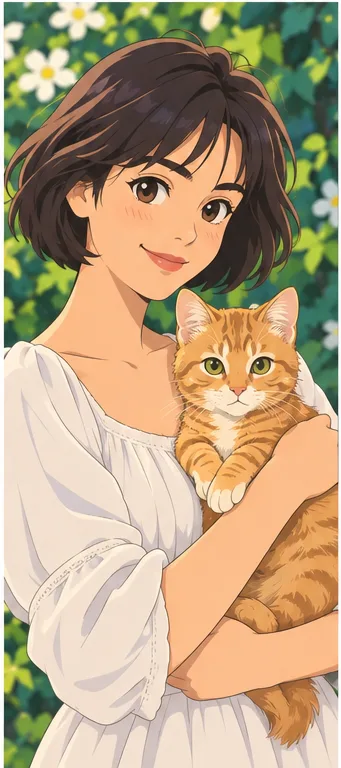
Smooth illustrated shading and drawn eyes feel gentler than the neon city. Compare it for a character portrait where expression matters more than artificial night lighting. The face may change in this direction too. Do not choose it expecting the same cyberpunk image with brighter exposure or a faithful animation of yourself.
The source need not already be a night photograph; it should provide clear information before new lighting is invented.
Avoid deeply hidden eyes Choose a visible expression, unclipped hair and enough space around shoulders. Strong sunglasses, motion blur and deep shadows make it harder to judge whether the redraw preserved the intended person. An already saturated neon snapshot may compound glare. Try a simpler, evenly visible portrait first; the preset does not provide a mask to relight only the background.
Remove the need for exact labels Clothing text, badges and signs can become invented lettering. If an event name or title must be correct, add it later with real typography and check permission. Do not use the effect to imply professional credentials or participation in a real venue. For a product shot, changed packaging and markings may make the image unsuitable despite appealing light.
Check face, light and setting separately
Glow can hide errors at first glance. Give each element a clear acceptance criterion.
Compare identity beneath the color Inspect eyes, smile, face shape, hands and any pet markings against the original. Bright edges can make a changed jaw or extra finger look deliberate. Accept a fictional likeness only if it suits your purpose and you have permission. Reject an output that could misidentify someone; AI styling is not a guarantee of recognizable identity or a method for verified professional portraits.
Look at the actual avatar size Preview the target crop on a phone and check the subject against the bright background. Tiny signs and light streaks may compete with the face or become noise after compression. The preset has no exposure or neon-intensity slider. If the subject is unreadable, change the source or choose a calmer medium rather than assuming more glow means a better result.
Keep fictional atmosphere separate from factual use
Before sharing, decide how the viewer should understand the changed setting.
Avatars and creative posts Describe the result as stylized or AI-created when the context could confuse viewers. Keep the original separately and check the downloaded dimensions and format. Use your own or permitted photos, not another person's face to suggest an endorsement. A picture does not clear rights to logos, copyrighted characters or an identifiable game world, even if it has a broad futuristic mood.
Posters without promised motion or layouts Add exact titles and layout in another editor. Inspect a small proof before ordering print, because luminous screen colors may look different on paper. This output is a static raster image, not a game asset, editable lighting scene, animation or video. It does not create a matching fictional cast across multiple pictures or authenticate any invented street signage.
01Open Cyberpunk and upload The button selects the effect in the photo workspace. Upload a supported, permitted photo with clear eyes and expression; keep the source for comparison.
02Confirm the request and credit total Check the selected effect, current credits and result count. More photos or styles increase the requested outputs; this page does not promise a free unlimited filter.
03Review before you publish Inspect face, hands, text and the small crop. Save an appropriate fictional image, or choose a quieter style if the light keeps obscuring the subject.
A neon portrait is not a verified photograph
AI may change identity, skin color, clothing, anatomy, lettering and setting. The output is a still raster illustration, not an untouched photograph, actual event record, video or 3D scene. No named game, studio or exact lighting setup is guaranteed. References are illustrations, not authenticated customer generation evidence.
Use a photo you can share with the service
Upload only photos you may authorize the service to process, with permission from other people shown. Avoid sensitive documents. Generation sends the image for processing, not local-only editing. Finished work can be viewed and downloaded in My Creations; removing a completed record hides it from your user history but is not a promise of immediate erasure from administrative records, providers or backups. Read the privacy policy and contact [email protected] for a data-deletion request. Review images before sharing, especially when another person or a child appears.