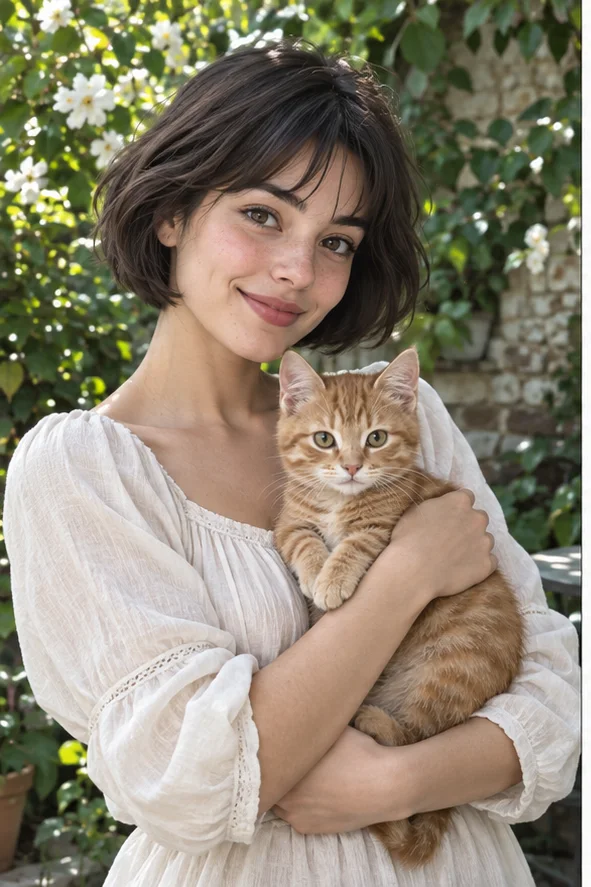
Imagine your portrait or pet as a little modeled character: chunky hair, rounded surfaces and visible material instead of photographic pores. Compare the owned illustrations below, then open Clay in the photo workspace. You will create a still picture with a dimensional appearance, not a physical figure or a file for a 3D printer. Start with a photo whose expression and silhouette matter to you; the AI may reinterpret them.
Style illustrations, not verified before-and-after outputs from the live tool. They show a visual direction; your photo may produce different colors, likeness and details.
Choose clay for the material, not exact facial reproduction
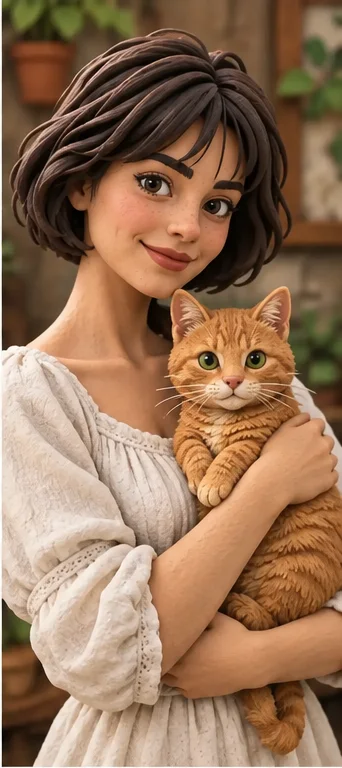
A clay-style avatar can feel tactile even on a flat screen. In our example, the woman's hair becomes molded strands and the cat's fur becomes larger shapes. That simplification is useful when you want a playful keepsake, but not when every eyelash or coat marking must remain exact. Choose a portrait you are allowed to use and judge whether the new character is still recognizable. A pretty miniature look alone is not proof that the person or pet was preserved.
Rounded material, drawn character, or angular geometry?
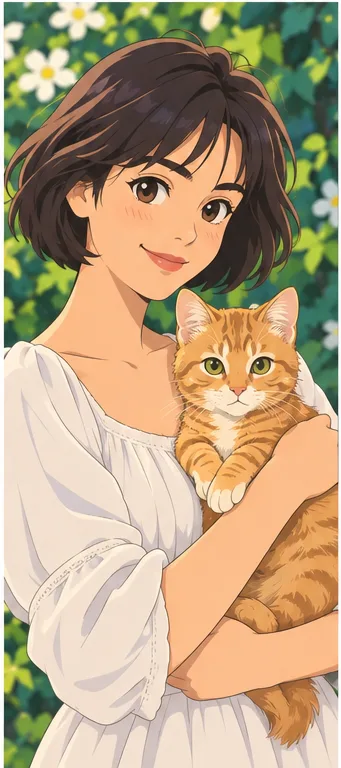
These are our own illustrative references, not customer generations or a controlled comparison. They help you choose what should change: surface material, character drawing or geometric construction.
Clay: thick strands and modeled surfaces
The hair reads as sculpted pieces, while the face and cat have rounded volume. Choose this for an object-like portrait rather than a flat drawing. Inspect whether hands merge into the animal and whether familiar markings disappear. The preset does not offer separate matte, gloss or fingerprint controls; no exact material finish is guaranteed.
The illustrated eyes and shading suggest a drawn character rather than a modeled object. Compare it if dimensional cheeks or chunky hair are not the effect you want. It may still exaggerate features, but the important decision is the visual medium, not which picture looks more photographic.
Flat polygon-like color planes turn the face and cat into angular forms. Choose this for a faceted geometric avatar, not soft clay. Neither direction produces a mesh you can rotate. Examine eyes and ears in the small preview: a plane can erase a feature that a rounded form would describe differently.
Material transformation is easier to judge when you know where one body or object ends and another begins.
Separate hands, faces and paws For a person holding a pet, show the hand and animal clearly rather than hiding them in shadows. Leave room around ears and hair. Two touching faces or fingers across a muzzle may become one modeled shape. Try a simpler source before paying for several versions of a difficult pose; the preset is not a manual sculpting editor.
Decide which detail makes it yours A distinctive hairstyle, pet marking, glasses or favorite garment can carry recognition after skin texture disappears. Identify two or three essentials in advance, then compare those with the output. Tiny jewelry and thin frames may thicken or vanish. If that detail must be accurate for a product listing or identification, keep the original photograph for that task.
Review the figure, not just the cute finish
Attractive material can make invented anatomy look intentional. Check the whole figure before saving.
Count connections and inspect the silhouette Check fingers, paws, ears, neck and the contact between clothing and limbs. Watch for duplicated parts, a hand fused into fur or a cat tail joining a sleeve. View the silhouette at avatar size as well as the full image. The portrait should remain legible without relying on the background to explain what you are seeing.
Check material and expression together Look at whether the eyes, smile and surface treatment belong to the same character. A glossy eye beside modeled hair may suit your taste; a photograph-like cheek inside a heavily sculpted face may not. There is no slider here to tune individual surfaces. Reject or regenerate an unsuitable result instead of treating every material change as an improvement.
A keepsake image is not a manufactured object
Plan the destination before turning a nice illustration into a paid gift or a public identity.
Cards and small personal prints Inspect the actual downloaded format and pixel dimensions, then make a small proof before ordering a large print. Add exact names or dates in a separate layout editor. Ask permission to share another person's likeness, and describe the picture as a stylized AI illustration rather than a photograph of a handmade gift you actually commissioned.
No animation rig or printable mesh The picture contains an impression of depth, not measurable geometry. It supplies no STL, OBJ, separate limbs or turntable views, and it does not create a stop-motion sequence. A maker would need a separate design process to produce a real sculpture. Do not send this image to a printer expecting a ready-to-build object or promise identical characters across multiple pictures.
01Open Clay and choose a permitted photo The button preselects Clay. Upload a supported image with a visible face or pet and a pose you can inspect; keep the original nearby.
02Check the total before generating Confirm the selected style and current credits in the workspace. More photos or styles create more requested results; this page does not promise free generation.
03Inspect, then save or try another source Compare expression, body connections and personal details. Save a suitable illustration, or simplify the source if modeled shapes keep merging.
A clay appearance does not establish identity or physical feasibility
AI can alter facial proportions, animal markings, text, background and anatomy. This is a raster still image, not a real clay sculpture, animation or 3D-print file. No named film character, finish or faithful likeness is guaranteed. The examples illustrate material choices and are not authenticated customer results.
Use a photo you can share with the service
Upload only photos you may authorize the service to process, with permission from other people shown. Avoid sensitive documents. Generation sends the image for processing, not local-only editing. Finished work can be viewed and downloaded in My Creations; removing a completed record hides it from your user history but is not a promise of immediate erasure from administrative records, providers or backups. Read the privacy policy and contact [email protected] for a data-deletion request. Review images before sharing, especially when another person or a child appears.