
Picsart × My Look Story
Looking beyond Picsart filters? Decide whether to edit or redraw your photo
A filter search can mean two different things: keep the photograph and adjust its appearance, or turn its subject into a new illustration. This page focuses on that boundary, not on replacing every feature of Picsart. Compare our original-reference and painting illustrations, then open oil painting preselected to try a decorative image of your own.
Turn my photo into an oil illustration ↗Independent guide · No affiliation with the named competitor · Published by My Look Story
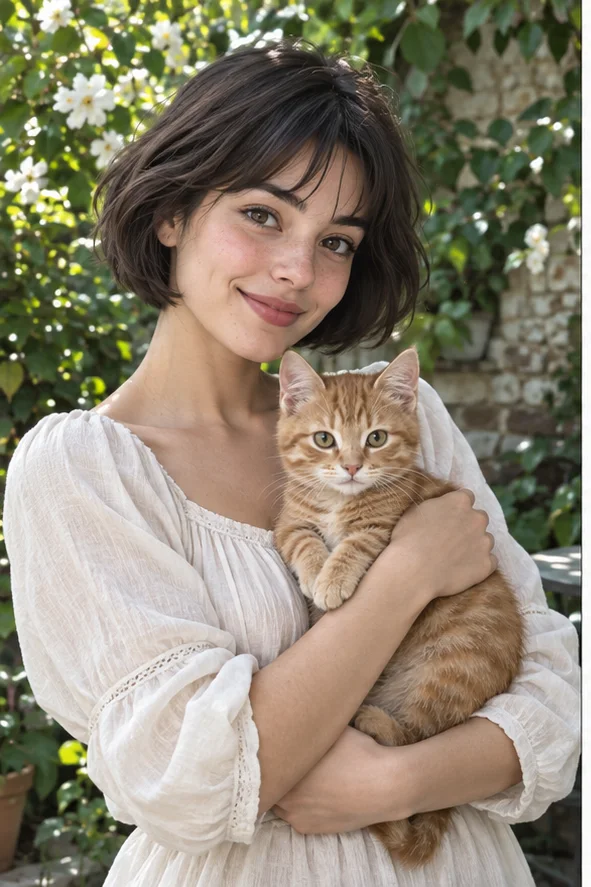 Reference illustration
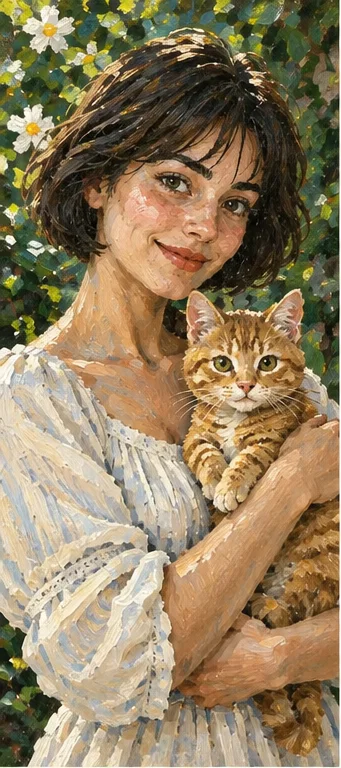 Oil-style illustration
The practical answer
Picsart's official effects page describes choosing effects, customization and download. Its painting guide also describes a reference-photo generation route. My Look Story's photo filters use selectable artistic directions such as oil, watercolor and pencil. Use an editing workflow when factual details must remain intact; try a redraw for an explicitly illustrative avatar or keepsake. This is a workflow guide, not a paid output contest or a claim to replace Picsart's whole editor.
1. A color treatment is not the same deliverable as new artwork
Before choosing a service, write down what cannot change. For a product listing, the label, shape and material may be essential facts. For a family keepsake, the recognizable people or pet may matter more than background leaves. If you only want exposure, contrast or color adjustments, do not assume an AI repainting preset will leave every object untouched. A visually pleasing result can still be unsuitable for factual use.
Picsart presents both photo effects and wider creative editing. Its painting guidance includes using a photo as a reference for generation. Our narrower workflow selects a named art direction and submits the source for reinterpretation. We do not promise an editable stack of layers, local masking controls or every Picsart adjustment. If your project depends on those controls, check the actual editor before switching tools.
2. Choose the mark-making you want, not a vague AI label
Oil painting aims for visible brushwork and opaque tonal masses. Watercolor suggests light washes and softened edges. Pencil focuses on monochrome marks and shading. In the examples here, inspect the cheek, white sleeve, cat's whiskers and flowers rather than just the overall mood. Those features reveal how the subject is being reinterpreted. The illustrations explain the directions; they do not predict your own result.
Choose one direction for your first attempt. A portrait for a small avatar benefits from a clear silhouette; a decorative print can tolerate more texture but needs file and print checks. Do not request every artistic effect simultaneously just because a menu has many choices. This guide links the existing oil, watercolor and pencil pages for their specific decisions rather than creating duplicate pages for every variation of a brand query.
3. Prepare a source that survives artistic simplification
Use a sharp photo with one clear subject and enough light to distinguish important details. A pet's distinctive markings, a person's eye shape or a building's outline should be visible before upload. Busy backgrounds and tiny distant faces leave less usable structure. If the original includes text, assume it may be altered or lost in an artistic redraw. Keep an untouched copy and avoid uploading private documents.
Match the composition to your intended use before submission. The preset is not a promise of transparent background, exact cropping or vector paths. If you need a square avatar, leave room around the head when choosing the source; if you need a print, inspect the downloaded dimensions rather than treating the screen preview as print-ready. Copyright and permission still apply to the source photograph and the resulting artwork.
4. Start with one output and review the actual file
The creation button opens our photo-filter workspace with oil selected. Upload your own permitted image, confirm the visible settings and submit only when you understand the displayed cost. Our production style listing showed oil, watercolor and pencil active and two credits per result at this review. That does not establish whether a Picsart plan is cheaper, whether generation is free, or how many attempts your project will need.
First compare the result with the original: face shape, eye placement, pet anatomy, hands, jewelry, labels and object boundaries. Reject added fingers, missing paws or a changed expression that defeats the purpose. Then inspect texture at full size and at the real display size. If you test multiple tools, keep the reference and intended treatment consistent and record the selected route; comparing a traditional filter with a generative redraw is not a fair quality experiment.
5. Sharing, privacy and the limits of this comparison
Present an artistic image as an illustration when it could otherwise be mistaken for an accurate photograph. Do not use a redrawn product to prove its condition or an altered portrait as an identity document. For printing, check the downloaded file with your print provider and try a sample first. AI texture on a monitor does not guarantee matching paper color or sufficient resolution for a large canvas.
Photos are sent for processing, not edited entirely offline. Only upload material you may share with the service. You can remove completed records from My Creations; this does not verify immediate erasure of administrative records, provider copies or backups. Use the privacy policy and support for deletion requests. My Look Story has a commercial interest in its own tool and is not affiliated with Picsart. We read official effects and painting pages and checked our public presets, but did not run paid same-photo tests, validate export claims for every plan or rank speed and quality. Reviewed October 3, 2026.
Official sources
Reviewed October 3, 2026
Privacy and deletion requests ↗