
Fotor GoArt × My Look Story
Looking beyond Fotor GoArt? Choose the painting you want first
A photo-to-painting tool should help you decide how the picture will be interpreted, not simply attach an art label. Fotor's GoArt page offers painting-style exploration inside its photo-editing ecosystem. My Look Story starts with a selectable medium and a photo-first workspace. Use this guide to choose between a broader editing workflow and a focused painting-style starting point.
Try my photo in Oil ↗Independent guide · No affiliation with the named competitor · Published by My Look Story
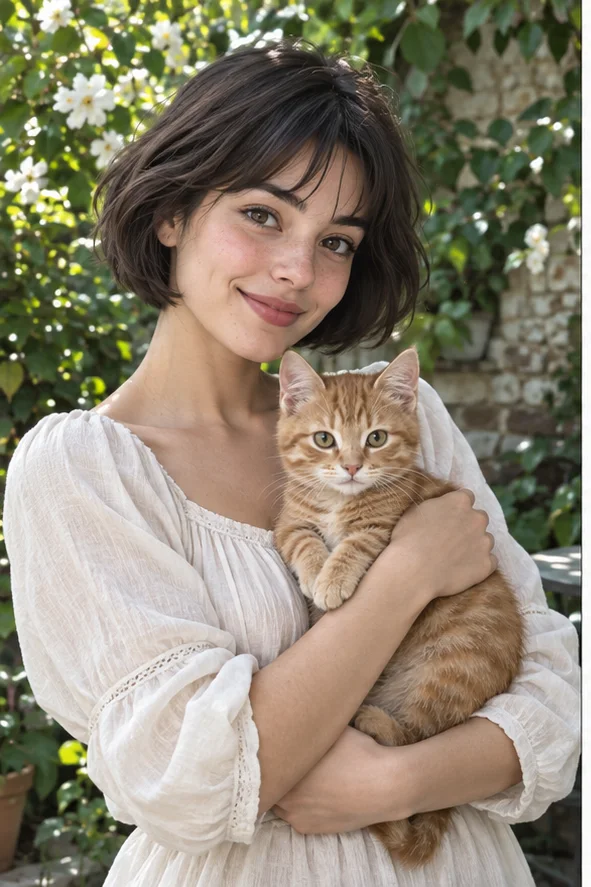 Reference illustration
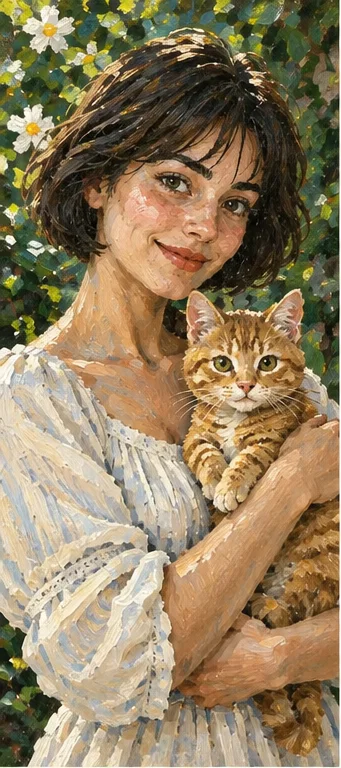 Owned oil-style illustration of a woman holding an orange cat with visible layered brushwork
The practical answer
Stay with Fotor if its current GoArt choices and wider editor fit the design you are already making. Try My Look Story if you want to begin with a named medium such as Oil, Watercolor or Acrylic, prepare the subject and inspect a creative interpretation. We publish this guide and provide one of the tools. There is no tested winner, paid same-photo benchmark or promise of a lower total cost.
1. Choose a medium, not just a painting label
Fotor's official GoArt product page describes turning a photograph into art through style selection. Its help article also describes entering the art workflow and choosing an effect. These are public workflow descriptions, not proof of the current controls in every account, region or plan. Check the option you actually receive rather than assuming every pictured style is included.
My Look Story's active catalog includes Oil, Watercolor, Acrylic and other illustration directions. Oil starts selected from this page; you can change it in the workspace. The accompanying image shows layered brushwork around a person and cat. Use the linked medium guides to decide whether you instead want a light wash or firmer opaque planes. A shared word such as painting does not mean the services use the same model or effect.
2. Match marks to the project you are making
For a keepsake portrait, decide whether the recognizable expression and pet markings matter more than surface texture. Oil-like layered strokes are a direction for a traditional painted feel. Watercolor can give a lighter surrounding treatment; Acrylic emphasizes broad color areas and brush boundaries. These are visual choices, not a quality order or claims that one medium always preserves identity better.
If the painting is one part of a poster, consider where names and headings will go. Fotor's broader editor may fit an existing design workflow; inspect its current typography and export options before choosing. My Look Story's photo-filter workspace creates the interpretation rather than guaranteeing a complete print layout. Add important wording in a layout step, and check the actual downloaded dimensions before ordering a physical product.
3. Prepare one source that exposes the decision
Use a clear photograph with the whole subject visible and enough space around ears, hair and hands. For a person holding an animal, keep the animal's face uncovered and separate its body from similarly colored clothing. A painting effect can simplify fur and fabric; it cannot reliably recover the identifying information that was never in the source. Keep the unmodified file so you can compare later.
Avoid judging services with different originals, lighting or crops. A complicated background with small signs tests lettering and structure as well as paint appearance. If your goal is a clean keepsake, remove unnecessary complexity at the source rather than blaming the chosen medium. Only upload photographs you may use, and obtain appropriate consent for another person's private image.
4. Understand selection and credit costs before submitting
The production My Look Story filter catalog currently lists 2 credits per output. The workspace supports choosing photo filters and displays the selected styles, expected number of outputs and total before submission. Adding another style creates a different requested interpretation; it is not a free refinement of the first one. Confirm the live quote, any account requirements and download conditions instead of treating an example as an unlimited offer.
We have not completed a paid Fotor checkout and matching result test for this guide. Fotor's marketing statements about access, output or speed should not be converted into a blanket claim about every plan, nor into a price advantage for My Look Story. Compare current conditions for the actual task and region. Neither a public page nor a preset menu proves the quality you will receive on your own photograph.
5. Accept the subject before admiring the paint
Inspect the eye positions, facial outline, hands and pet markings against the source. Broad strokes and simplified shading can be part of the style; extra fingers, merged limbs or a missing identifying patch are different issues. View the picture at both the intended display size and a closer scale. A pleasing canvas-like surface is not evidence that anatomy or identity remained exact.
AI painting can change objects and text. Do not use these illustrations as accurate product documentation, official identity photographs or proof of a real painting commission. A downloaded raster image is not editable brush geometry, a physical canvas or an automatically cleared merchandise license. Check printing needs and image rights separately. Trying another available medium can explore a different look but does not guarantee a particular correction.
6. Scope, privacy and how we compared
Reviewed October 10, 2026, using Fotor's official GoArt product description and its photo-to-art help instructions, alongside My Look Story's live filter catalog and preselected creation path. Some help instructions are older; they establish the described workflow, not a current account-level verification. The owned reference and oil illustration explain our visual direction only. We did not copy Fotor's images or run a controlled comparison of paid outputs.
This is an independent, interested-party workflow guide published by My Look Story, with no affiliation or endorsement from Fotor. It does not rank the services or guarantee identical likeness, fixed speed or cheaper results. Check each service's current privacy, retention and deletion terms before uploading sensitive photos. Use the privacy link for our stated data handling and deletion-request process; do not assume the two services share one policy.