
YouCam Makeup × My Look Story
Trying hairstyles beyond YouCam? Make a shortlist you can actually discuss
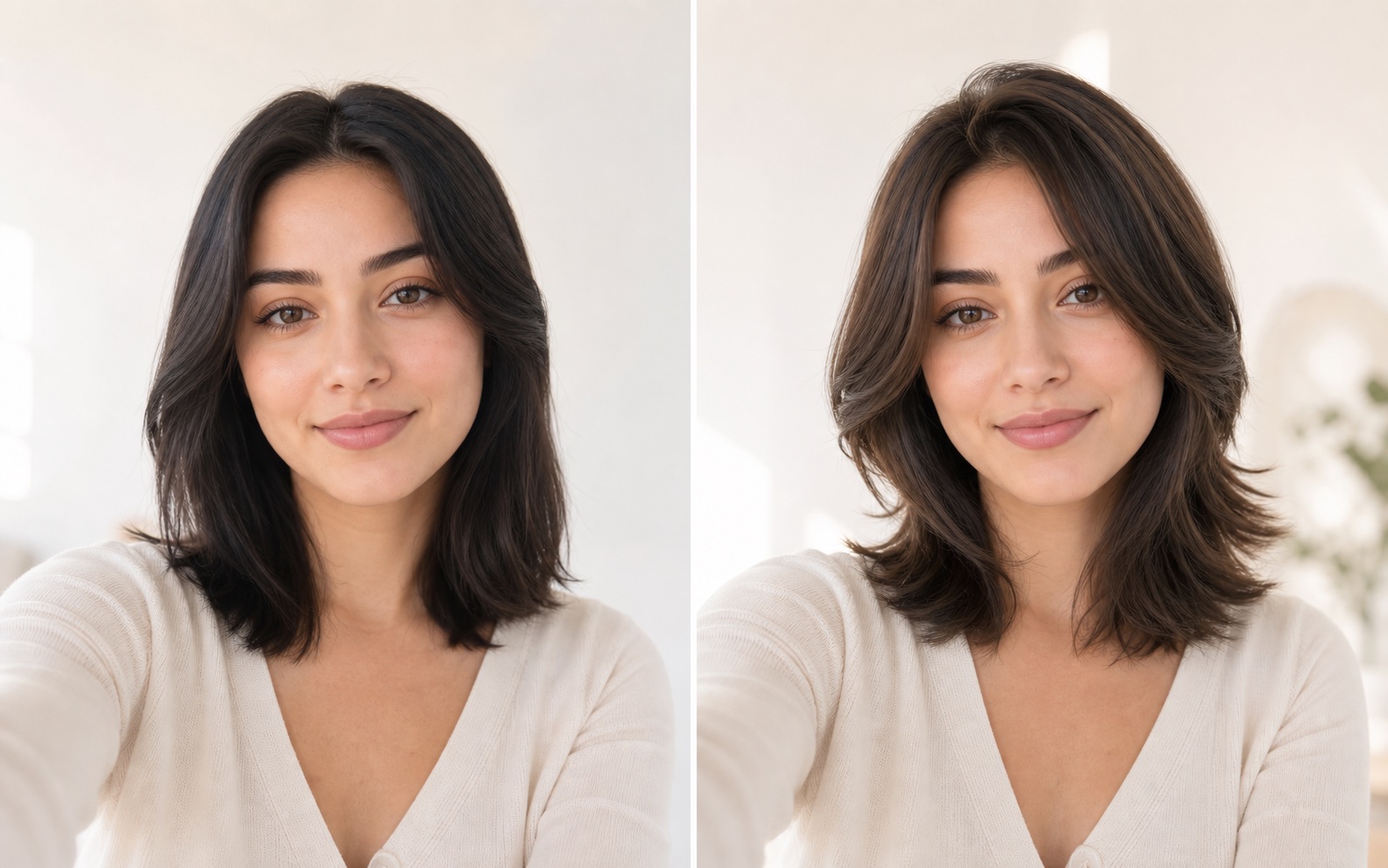
The useful outcome is not dozens of dramatic transformations: it is a small set of haircuts you understand well enough to discuss with a stylist. This guide compares YouCam Makeup's beauty-app route with our browser hairstyle workspace. See the illustrative length change, prepare a clear photo, and explore a realistic silhouette before deciding to cut.
Try hairstyles on my photo ↗Independent guide · No affiliation with the named competitor · Published by My Look Story
The practical answer
YouCam Makeup's official hairstyle page describes importing a photo, browsing hairstyles and previewing a transformation in its app. My Look Story offers a browser hairstyle workspace plus guides for specific cuts and real-life constraints. Stay with a beauty app if its surrounding makeup workflow matters to you; try our browser route to organize a haircut decision. Neither preview guarantees how your natural hair will grow, lie or respond to cutting and styling.
1. Name the right YouCam product before comparing it
YouCam is a family of beauty products, not one interchangeable button. This page concerns YouCam Makeup's hairstyle use case, not a claim about every YouCam editor or its business API. Its public app instructions are the relevant source for a person trying hair on a photo. Check availability and the current purchase flow on your own device; an app feature and a separate web service may have different terms.
My Look Story's comparison is narrower too: hairstyle preview and a decision about a cut. Our creative photo filters that turn images into anime or paintings do a different job and should not be presented as a haircut simulator. Use the hairstyle workspace for hair choices. We do not claim to reproduce makeup controls, augmented-reality modes, automatic hair diagnosis or all the functions of YouCam's beauty ecosystem.
2. Change one haircut variable at a time
Start from a practical constraint: keeping enough length to tie it back, clearing glasses, reducing morning styling, or testing a shorter perimeter. Compare length first while keeping color and overall styling similar. Then test fringe placement or layers. If every preview changes length, color, texture and volume together, it becomes difficult to tell which change actually works for you.
For a bob, notice where the ends sit relative to chin and shoulders. For curtain bangs, look at where the opening begins and whether the shortest strands would stay out of your eyes. For layers, ask how much thickness remains at the ends. A flattering generated silhouette can assume blow-drying or curl shaping you do not want to repeat daily. Write down the maintenance you are willing to do before selecting your favorite picture.
3. Choose a source that exposes the boundaries
Use an evenly lit, recent portrait with the face and current hair visible. Leave room above the head and around both sides; a tight crop can hide the perimeter you need to judge. Avoid hats, hands crossing the hair, extreme side angles and heavy beauty filters. Keep your usual glasses if they are part of daily life. The photo should represent you, not an idealized face already altered by another app.
A front photo cannot fully describe crown growth, cowlicks, density at the back or the way curls shrink after drying. You can take additional real reference photos for your salon conversation, but do not imply that a generated front view has measured those properties. Fine hair, dense hair and textured hair may need different construction even when the requested outline looks similar on screen.
4. Inspect the preview, then translate it into salon questions
The main button opens the hairstyle tool in our workspace. You choose the available cut direction and review current credits before submitting; this page does not promise a free generation or an instant result. Keep the original beside the output. Check that the face, hairline, ears and glasses remain recognizable and that strands do not melt into clothing or the background. Reject a preview that wins only by changing your features.
Choose two or three distinct options rather than collecting near-identical images. Bring the pictures and ask a stylist where the shortest layer would land, whether the back can still be tied, what your natural texture would do and how often reshaping might be needed. Ask what can be achieved without the styling seen in the preview. The AI image is a conversation aid, not a cutting specification, hair-health assessment or promise of the same finish.
5. Decide between app convenience and a browser decision path
If you already use YouCam Makeup for a broader beauty routine, keeping hair exploration in that familiar app may be convenient. If you want a browser route with explanatory pages on bob length, fringe and daily constraints, our workspace and linked guides are another option. If exact feasibility matters before an irreversible cut or color change, the final decision belongs with a qualified stylist who can see and handle your actual hair.
We read YouCam's official app feature page and hairstyle decision article and checked our public hairstyle workspace. My Look Story benefits when you use its tool and is not affiliated with YouCam or Perfect Corp. The example is our own illustrative asset, not a copied competitor photo or a measured output comparison. We have not tested both paid plans, compared identity accuracy or confirmed all device-specific availability. Upload only authorized photos; processing is not local-only. Completed records can be removed from My Creations, without a promise of immediate erasure across providers and backups. See the privacy policy or contact support for deletion requests. Reviewed October 3, 2026.
Official sources
Reviewed October 3, 2026
Privacy and deletion requests ↗